
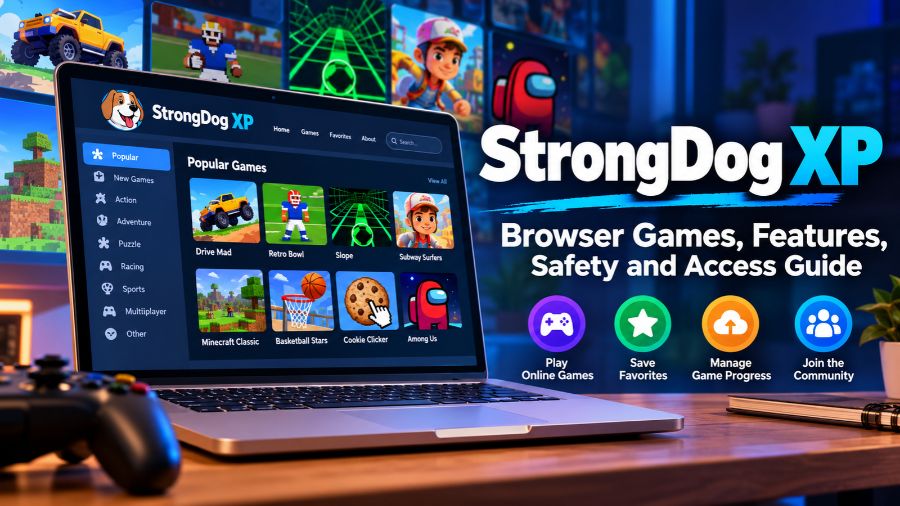
What Is StrongDog XP?
StrongDog XP is an online gaming website focused on browser-accessible games, including titles from different gaming categories. Rather than requiring users to install a separate application for every game, the platform provides a central interface through which supported games can be discovered and launched. It is particularly associated with the unblocked games category, which attracts students and people using networks that restrict access to entertainment websites. Its official website describes a community-oriented experience featuring a large game collection, favorites, accounts, and game requests. Although the platform may offer convenient access to casual entertainment, individual games can have different technical requirements, and availability may change over time.
How Does StrongDog XP Work?
StrongDog XP operates through a web browser, where users can browse available titles and select games from the website’s interface. Depending on the particular game, the browser loads a web-based version that runs using supported web technologies, such as HTML5 and JavaScript, or another compatible implementation. This approach eliminates the need for a conventional desktop installation for many games, although some titles may require additional loading time or specific browser capabilities. The platform also provides navigation options for discovering popular titles and managing favorites. Its functionality depends on the website, the underlying game files, browser compatibility, network conditions, and whether the selected game remains available.
Accessing the Game Library
Users generally begin by opening the StrongDog XP website in a compatible browser and selecting a title from the available collection. The interface includes sections for popular games, favorites, and the wider library, helping visitors find something to play without searching across multiple websites. However, a game’s presence in a catalog does not guarantee that it will load successfully on every device. Some titles may be temporarily unavailable, removed, or affected by technical problems.
Browser-Based Gameplay
Browser-based gaming is convenient because it reduces the need for installations and can work across different operating systems. A compatible laptop, desktop computer, tablet, or smartphone may be sufficient for certain games, provided the browser supports the required features. Performance still depends on processing power, memory, screen size, and internet connectivity. Games with complex controls or graphics may also be more comfortable to play on a computer than on a touchscreen device.
Key Features of StrongDog XP
StrongDog XP combines several features designed to make browsing and playing games more convenient. Its official descriptions mention a collection of more than 1,000 games, a curated Top 20 section, favorites, account functionality, cross-device progress-saving options, a community space, and tools for submitting game requests or reporting problems. These features make the platform more than a basic page containing individual game links. Nevertheless, the availability and performance of particular functions can change, and users should check the current interface rather than assume every feature works identically across all versions or alternative domains.
Large Collection of Online Games
A broad game library gives users opportunities to explore different genres without committing to a single title. Someone who enjoys puzzles might choose a logic game, while another player might prefer racing, sports, platform, or arcade experiences. A large collection can also help users discover unfamiliar games. However, the size of a catalog is only one measure of usefulness; organization, loading reliability, game quality, and compatibility matter just as much.
Top 20 and Popular Games
A curated Top 20 section helps visitors identify selected games without browsing the entire library. This is useful for people who want a quick recommendation or prefer to start with a smaller selection. However, a displayed ranking should not automatically be interpreted as an independently verified popularity ranking or a measurement based on publicly available player statistics. It is more accurate to view it as the platform’s own curated selection unless the website explains how its rankings are calculated.
Favorites and Personalization
The favorites feature allows users to keep track of games they want to revisit. This reduces the effort involved in finding a preferred title within a large catalog. Personal collections are particularly helpful for people who regularly switch between a few familiar games instead of constantly exploring new ones. Users should check whether their favorites are stored locally or associated with an account, because the persistence of saved preferences can depend on how the feature is implemented.
Accounts and Saved Progress
StrongDog XP advertises account options intended to help users save game progress across devices. This can be valuable when a game supports saving and a player wants to continue later on another computer. However, cross-device synchronization is not guaranteed for every title. Some games may use their own saving systems, while others may not support persistent progress at all. Users should review the available account and save-management features before relying on them to preserve important game data.
Save Manager
The platform also advertises a save manager that supports downloading and uploading saved game data for compatible titles. Such functionality can help users preserve progress or transfer supported saves between sessions. Its usefulness depends on how each game stores information and whether the save format is compatible with the tool. Before importing or exporting data, users should understand what they are saving and avoid uploading files from unknown sources.
Community and Game Requests
Community participation is another part of the StrongDog XP experience. The platform promotes a Discord community where users can discuss ideas, suggest games, and communicate about problems. Its website also describes options for requesting games and reporting bugs. These channels may help users understand whether a missing title is being considered or a technical issue has been reported. As with any online community, participants should protect personal information and be cautious when interacting with unfamiliar people.
What Types of Games Can You Find on StrongDog XP?
StrongDog XP is associated with a variety of browser-game categories rather than one specific genre. The available selection may include arcade challenges, sports games, racing experiences, platformers, puzzles, and casual games. Different genres appeal to different audiences, which is one reason a broad library can be useful for students and casual players. However, the exact selection can change as titles are added, removed, or affected by compatibility issues. Players should use the current game catalog to confirm whether a particular title is available instead of assuming that every popular browser game is supported.
Arcade and Casual Games
Arcade games generally emphasize straightforward controls, quick rounds, and progressively challenging gameplay. They can suit short breaks because players can often begin without learning complicated mechanics. Casual games may include simple objectives, timing challenges, and short puzzle experiences. Their accessibility makes them appealing to beginners, although some titles can still become difficult as levels progress.
Racing and Platform Games
Racing games focus on speed, movement, obstacle avoidance, and control, while platform games often require players to jump, navigate obstacles, and complete levels. Both categories can provide engaging challenges through increasingly demanding gameplay. Keyboard controls may offer a better experience on desktop computers, although some browser games provide touchscreen support. Performance depends on the specific game and the capabilities of the device being used.
Sports and Puzzle Games
Sports games can recreate elements of activities such as football, basketball, or other competitive sports, while puzzle games emphasize logic, pattern recognition, and problem-solving. These genres serve different preferences: sports titles appeal to people who enjoy competition, whereas puzzles can offer a more deliberate challenge. Their educational value should not be overstated, but some puzzle games can provide opportunities to practise reasoning and concentration.
Why Do People Search for StrongDog XP Unblocked Games?
The term unblocked games usually refers to games that remain accessible on networks where certain entertainment websites are restricted. StrongDog XP is associated with this category because students frequently look for browser games that do not require conventional installations. The distinction is important: a website’s reputation as an unblocked gaming platform does not mean it will work on every school, workplace, or public network. Network administrators may block gaming domains, restrict particular technologies, or limit access according to local policies. Users should follow applicable rules rather than attempt to bypass security controls on managed devices.
Access on School Networks
School networks commonly apply filtering to support learning, protect students, and manage bandwidth. A gaming website might be available on one network but blocked on another because institutions use different filtering policies. StrongDog XP cannot guarantee access through a particular school’s internet connection. Students should follow their institution’s acceptable-use policy and use gaming websites only when permitted, such as during approved breaks or on personal networks.
Access on Restricted Computers
Some public or workplace computers limit software installation and restrict particular websites. Browser-based games can be convenient on devices that allow permitted web applications, but restrictions may still prevent them from running. Users should not install unauthorized software, change managed settings, or bypass organizational security measures to access games. If a website is blocked, the appropriate response is to respect the restriction or ask the responsible administrator about permitted use.
Is StrongDog XP Free to Use?
StrongDog XP presents itself as a browser gaming platform with a free-access experience. Its website advertises free account functionality alongside game browsing and other features. However, this should not be interpreted as a guarantee that every linked game, external service, or optional feature is free under all circumstances. Individual games may have their own monetization arrangements, while websites can change their policies over time. Users should check for payment requests, subscriptions, or third-party offers before entering payment information. A game that loads without an installation fee may still contain advertisements or other monetization features.
Is StrongDog XP Safe to Use?
The safety of StrongDog XP depends on the exact domain, the content loaded by individual games, the website’s current behavior, and how users interact with it. A browser-based platform can reduce the need to download executable game installers, but that alone does not establish that every page or external link is safe. An automated reputation assessment of the gametreexp.github.io version published a mixed trust assessment in September 2026, noting limited independent reputation information and recommending caution rather than identifying confirmed malicious activity. Such assessments are not definitive security audits, so users should not treat a single score as proof that a site is either safe or dangerous.
Privacy and Personal Information
Users should avoid sharing unnecessary personal information with gaming websites. If creating an account, review the information requested and consider whether registration is needed for the intended activity. Use a unique password rather than reusing credentials from email, banking, or other important accounts. Be especially cautious when a game page or community member requests sensitive details, account credentials, or information unrelated to playing games. The platform’s available privacy information should be reviewed before submitting personal data.
Ads, Pop-Ups, and External Links
Advertisements and external links can introduce risks that are separate from the games themselves. Unexpected pop-ups, fake download buttons, browser-extension offers, and urgent security warnings should be treated cautiously. Do not allow notifications or download files simply because a page claims they are necessary to play. If a game opens an unfamiliar domain, verify where it leads before interacting with it. Closing a suspicious page is safer than following instructions that request personal details or software installation.
Security on Shared Devices
Shared computers may retain browser history, saved sessions, downloaded files, or account information after a user finishes playing. Avoid saving passwords on public or school computers unless the device is explicitly intended for personal use. Sign out of accounts when finished, and close unnecessary tabs. If you downloaded a save file, ensure that it came from a source you trust and that you understand how it will be used.
Advantages and Limitations of StrongDog XP
StrongDog XP’s main advantage is convenience: users can explore a variety of browser games from one central location, often without installing a dedicated gaming application. Its favorites, curated selections, save-management tools, and community features can make discovery and repeat visits easier. The platform may also be useful for casual entertainment on compatible devices. Its limitations include uncertain game availability, differences in browser performance, potential access restrictions, and questions about the privacy and security of particular pages. A large library does not guarantee consistent quality, and users should weigh convenience against the reliability of the games and the trustworthiness of the website.
StrongDog XP vs. Other Browser Gaming Websites
Browser gaming websites vary in how they select games, organize their catalogs, manage accounts, and handle advertisements. StrongDog XP emphasizes a broad collection, unblocked-game access, favorites, and community involvement. Other platforms may focus on professionally curated titles, original games, competitive leaderboards, or publisher-supported experiences. There is no single best option for every user because the choice depends on the games available, device compatibility, privacy expectations, and the site’s overall reliability. When comparing platforms, consider the quality of the game catalog and the clarity of the website’s policies rather than relying solely on the number of titles or claims of unrestricted access.
StrongDog XP vs. Traditional Gaming Apps
Traditional gaming apps may offer more sophisticated graphics, offline functionality, controller support, and deeper game experiences. They can also require installation, storage space, updates, and sometimes paid purchases. StrongDog XP’s browser-based approach is generally more convenient for quick sessions and casual games, especially when installation is not practical. However, it cannot guarantee the same performance, features, or reliability as a dedicated game application. The most suitable choice depends on whether convenience or a more complete gaming experience is the priority.
StrongDog XP vs. Other Unblocked Game Sites
Other unblocked game sites may provide similar browser-based catalogs, but their game selections, interfaces, advertisements, and maintenance practices can differ considerably. Some may specialize in a few popular titles, while others offer larger collections or more structured discovery tools. Users should compare the actual experience rather than assume that all sites in this category are equivalent. In particular, check whether the desired game works, whether the domain appears trustworthy, and whether the site asks for unnecessary permissions or downloads.
Common Problems When Using StrongDog XP
Users may occasionally encounter games that fail to load, pages that open slowly, controls that do not respond, or features that behave differently across devices. These issues can arise from browser compatibility, network restrictions, temporary service problems, blocked scripts, or changes to the underlying game. A problem with one title does not necessarily mean the entire platform is unavailable. Before trying another game, check the browser connection and reload the page. Avoid installing unfamiliar extensions or disabling security protections to make a game work.
Games Not Loading
A game may remain stuck on its loading screen because of a slow connection, unsupported browser features, a temporary server problem, or unavailable game resources. Refreshing the page once and checking another known-working title can help identify whether the issue affects a single game or the wider website. If other pages work normally, the selected title may be the problem. Repeatedly clicking suspicious prompts or downloading supposed fixes is not a reliable troubleshooting method.
Compatibility on Mobile Devices
Some browser games work on smartphones and tablets, but others are designed around keyboard controls or larger screens. A mobile browser may also handle graphics, sound, and interactive elements differently from a desktop browser. If a title does not work well on a phone, try a supported browser update or a different game rather than assuming that all StrongDog XP features are mobile-compatible. Touchscreen usability depends on the individual game’s design.
Saved Progress Disappearing
Game progress may be lost if a title relies on temporary browser storage, local data is cleared, or synchronization is not supported. Account-based saving may help with compatible games, but it should not be assumed to work for every title. Before clearing browser data or switching devices, check whether the game provides an export option or whether the platform’s save manager supports it. Important progress should be backed up only through supported methods.
Responsible Gaming and Online Etiquette
Browser games can provide entertainment, but their convenience can also make it easy to spend longer playing than intended. Students should prioritize schoolwork and follow the rules governing personal device use and internet access. Taking breaks and balancing gaming with sleep, exercise, and other activities can help maintain healthy routines. Community participation also requires good judgment: avoid sharing private information, respect other users, and report inappropriate behavior through the available channels. These habits are useful regardless of which browser gaming platform someone chooses.
The Future of StrongDog XP
The future of StrongDog XP will depend on its continued maintenance, game compatibility, community participation, and ability to provide a reliable browsing experience. Browser technology continues to support increasingly capable games, but individual titles may become unavailable as technical requirements and distribution arrangements change. Features such as saved progress, improved navigation, and community-driven requests can make a platform more useful when they are maintained effectively. However, future updates, growth, and new features should not be treated as guaranteed. Users should rely on current website information rather than predictions about the platform’s long-term development.
Conclusion
StrongDog XP is a browser-based gaming platform that combines a broad game catalog with features such as curated selections, favorites, account options, save management, and community participation. Its main appeal is convenient access to casual games without requiring a conventional installation for many titles, making it relevant to students and other browser gamers. However, game compatibility, network restrictions, privacy, and website security remain important considerations. The platform is best approached as a convenient gaming resource rather than a guarantee that every game will work or every linked page will be safe. Understanding its features and limitations helps users make more informed decisions about when and how to use it.
Also read: Hrmtaila Explained: Meaning, HR Technology, Uses, and Important Facts
FAQs
1. What is StrongDog XP used for?
StrongDog XP is used to browse and play browser-based games from a central catalog, with additional features for favorites, saved progress, and community interaction.
2. Is StrongDog XP free?
StrongDog XP advertises free access to its gaming platform and account features, but individual games and external services may have separate costs or conditions.
3. Can you play StrongDog XP on mobile?
Some games may work on smartphones and tablets through compatible browsers, but performance and controls depend on each game’s design and device capabilities.
4. Is StrongDog XP safe for students?
Safety cannot be guaranteed for every page or external link. Students should avoid suspicious downloads, protect personal information, and follow school internet policies.
5. Does StrongDog XP save game progress?
StrongDog XP advertises account-based saving and a save manager, but progress preservation depends on whether the individual game supports these features.
6. Why is StrongDog XP not working?
StrongDog XP games may fail because of network restrictions, browser incompatibility, unavailable game resources, or temporary technical problems affecting the website or selected title.