
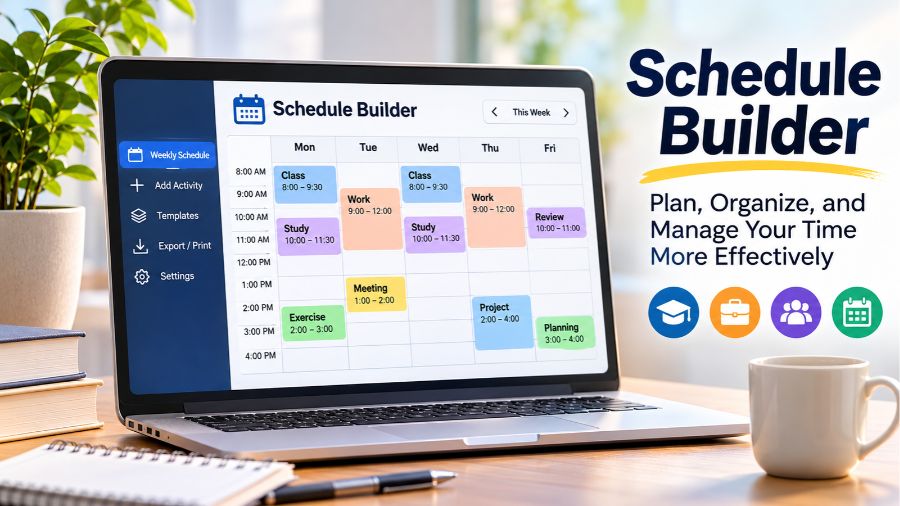
Schedule Builder is a useful digital planning tool that helps people organize their time, manage activities, and create structured daily or weekly timetables. Whether someone needs to arrange university classes, coordinate working hours, plan study sessions, or manage personal routines, a schedule builder provides a visual way to bring different commitments together. Instead of relying on handwritten calendars or complicated spreadsheets, users can create customizable schedules, adjust time blocks, and keep track of important activities in one place. Understanding how these tools work, which features matter, and how to choose the right platform can make everyday planning more organized and manageable.
What Is a Schedule Builder?
A schedule builder is an online application or software tool designed to help users create, customize, and manage time-based plans. It typically provides a calendar or timetable interface where activities can be assigned to particular days and time slots. Users can add events, specify starting and ending times, organize recurring commitments, and adjust their schedules whenever circumstances change. Some basic tools focus on personal weekly planning, while more advanced platforms support employee shifts, academic timetables, resource allocation, and automated scheduling. The term does not describe one particular application; it represents a broader category of digital planning solutions. Depending on the platform, a schedule builder may operate directly in a web browser, through a mobile application, or as part of a larger workplace or educational management system.
How Does a Schedule Builder Work?
Most schedule-building tools follow a straightforward process that begins with creating a new schedule and defining the period that needs to be organized. Users select the days they want to include, establish available hours, and start adding activities to specific time slots. Each entry can contain a title, description, duration, and sometimes a category or color. Many modern weekly planners offer drag-and-drop functionality, allowing users to move activities between days or change their duration without recreating them. Some applications also support recurring events, which makes it easier to organize regular classes, meetings, and work shifts. Once the schedule is complete, users may be able to save it, print it, export it, or share it with other people. More advanced scheduling systems can also consider employee availability, working rules, and resource requirements when generating schedules.
Different Types of Schedule Builder Tools
Schedule builders are available for different planning requirements, and selecting the appropriate type depends on the activities being organized. A student schedule builder focuses on lectures, laboratories, assignments, and study periods, helping learners understand how their academic commitments fit together. A work schedule builder is designed for organizing professional responsibilities, meetings, projects, and working hours. Employee scheduling software serves businesses that need to coordinate staff availability, shifts, and workplace coverage. Personal schedule makers provide a simpler approach to managing exercise, household responsibilities, appointments, and daily routines. Educational institutions may use more specialized timetable systems to coordinate classrooms, teachers, subjects, and student groups. Although these applications share the general purpose of organizing time, their features and complexity can differ considerably. A simple weekly planner may be sufficient for an individual, whereas a company managing multiple employees may require dedicated workforce management software.
Essential Features of a Modern Schedule Builder
The usefulness of a schedule builder depends on how effectively it helps people organize and update their plans. A clear visual calendar is one of its most important features because it allows users to understand their commitments without reading lengthy lists. Customizable time blocks make it possible to allocate specific periods to individual activities, while color coding helps distinguish between different categories. Drag-and-drop editing provides a convenient way to rearrange events when plans change. Recurring event support reduces repetitive data entry for activities that happen regularly. Some applications also provide printable layouts, PDF exports, calendar file compatibility, reminders, and schedule-sharing options. Advanced platforms may include automatic conflict detection, employee availability management, shift templates, and reporting features. However, not every application includes all these capabilities, so users should check the actual feature set before choosing a service.
Benefits of Using an Online Schedule Builder
An online schedule builder can make time management easier by bringing different commitments into a single, organized view. Students can see how lectures, revision sessions, and assignments fit into their academic week, while professionals can separate meetings from focused working periods. Having a visual overview also makes scheduling conflicts easier to recognize before they become problems. Another important benefit is flexibility because digital schedules can usually be updated without rewriting an entire timetable. Color-coded activities and clearly defined time blocks can improve readability, particularly when someone manages several responsibilities. Printable and downloadable schedules provide additional convenience for people who prefer keeping a physical copy. Shared scheduling features can also help teams communicate their availability and coordinate activities. Although a digital planner cannot guarantee better productivity, it can provide a practical structure that supports more consistent planning and reduces the effort involved in organizing everyday responsibilities.
How to Create an Effective Weekly Schedule
Creating an effective weekly schedule starts with identifying commitments that cannot easily be changed. These may include employment hours, university classes, appointments, and other fixed responsibilities. Once these activities have been entered, users can identify the remaining time and allocate suitable periods for studying, completing projects, exercising, and managing personal tasks. It is generally more practical to leave some flexibility instead of filling every available time slot. Breaks, travel time, and unexpected responsibilities should also be considered when arranging the week. A schedule becomes easier to follow when activities have realistic durations and clear priorities. Reviewing the timetable regularly helps identify unrealistic expectations or repeated conflicts. Users should also avoid treating every planned activity as equally urgent. A well-organized schedule should reflect actual commitments and personal priorities rather than simply attempting to fill every hour of the day.
How to Choose the Right Schedule Builder
Choosing a suitable schedule builder requires understanding what needs to be organized and how frequently the schedule will change. Someone looking for a simple weekly timetable should prioritize an easy-to-use interface, customizable time blocks, automatic saving, and convenient printing options. Students may benefit from recurring class entries, subject categories, and timetable views that make academic planning straightforward. Businesses should look for more advanced capabilities, including employee availability, shift management, scheduling rules, notifications, and administrative controls. Compatibility is another important consideration because some people prefer browser-based applications, while others need dedicated mobile access. Data storage also deserves attention. A tool that saves schedules locally in a browser may not automatically make them available on other devices. Cloud-based services can offer cross-device access, but users should review their privacy practices and account requirements. Pricing, export options, customer support, and access restrictions should also influence the final decision.
Popular Schedule Builder Platforms and Alternatives
Several online platforms illustrate the different approaches available in the scheduling software market. ScheduleBuilder.net offers a visual weekly planning experience for classes, work activities, and personal routines, with features for customizing and sharing schedules. SchedBuilder.com provides another weekly planning interface that emphasizes arranging classes, tasks, and breaks through movable time blocks. Google Calendar is a widely used alternative for organizing appointments, recurring events, and shared calendars. Businesses with more demanding staffing requirements may consider workforce management solutions such as UKG, which provides scheduling capabilities for employee management. These products are not identical alternatives because they address different planning needs. A personal timetable creator is generally easier to use for arranging a student’s week, while enterprise workforce software is designed around organizational requirements. Comparing actual features, access conditions, and pricing is more useful than assuming that every product described as a schedule builder performs the same functions.
Limitations and Challenges of Schedule Builder Software
Despite its advantages, schedule builder software has limitations that users should understand before depending on it for important planning activities. A basic planner may allow users to arrange events but provide no automatic method for detecting scheduling conflicts. Similarly, a visual weekly timetable cannot necessarily determine whether a selected class, appointment, or work shift is available in the real world. Some applications store information only in the current browser, meaning schedules may not automatically transfer to another device. Others require subscriptions for cloud synchronization, advanced exports, or collaboration features. Complex employee scheduling introduces additional challenges because availability, employment rules, staffing requirements, and last-minute changes can make automated scheduling difficult. Privacy is another consideration when schedules contain personal appointments, workplace information, or sensitive organizational details. Users should understand where their information is stored and who can access shared schedules. Ultimately, scheduling software works best when its capabilities match the complexity of the planning task.
The Future of Schedule Builder Technology
Schedule-building technology is evolving alongside developments in cloud computing, artificial intelligence, mobile applications, and workplace collaboration software. Traditional planners primarily provide a digital space for entering and organizing activities, while newer scheduling solutions increasingly explore ways to automate parts of the planning process. AI-assisted scheduling could help users suggest suitable time slots, identify overlapping commitments, and reorganize tasks when priorities change. Business scheduling platforms can also use operational requirements and employee availability to support workforce planning. Calendar integrations may make it easier to bring appointments from different services into a unified view. However, automated recommendations still depend on accurate information and appropriate scheduling rules. Users should retain control over important decisions, particularly when scheduling affects employees, academic commitments, or business operations. The most useful future developments will likely be those that reduce repetitive planning work while keeping schedules understandable, flexible, and easy to manage.
Conclusion
A schedule builder is a practical digital solution for organizing personal routines, academic timetables, professional activities, and employee working hours. Its value comes from providing a clear overview of commitments and making schedules easier to create, update, and share. While basic weekly planners are suitable for individuals who need straightforward time management, advanced scheduling platforms offer additional capabilities for schools and businesses with more complex requirements. Choosing the right solution involves considering usability, customization, automation, compatibility, privacy, and cost. As scheduling technology continues to develop, these tools can become increasingly useful for coordinating everyday responsibilities, provided users select platforms that genuinely match their needs.
Also read: SchoolTool Explained: Features, Parent Portal, Grades, and How It Works
FAQs
What is a schedule builder used for?
A schedule builder helps users organize activities, appointments, classes, work shifts, and personal responsibilities into structured daily or weekly timetables.
Are online schedule builders free to use?
Many online schedule builders offer free basic features, although cloud synchronization, advanced customization, collaboration, and additional exports may require paid subscriptions.
Can students use a schedule builder for university classes?
Yes, students can organize lectures, laboratory sessions, study periods, assignment deadlines, and other academic commitments using a customizable weekly timetable.
Can a schedule builder detect scheduling conflicts?
Some advanced applications identify overlapping events automatically, but basic planners may require users to recognize and resolve scheduling conflicts themselves.
Can I create a schedule builder without downloading software?
Yes, many browser-based schedule builders work online without installation, allowing users to create, customize, and sometimes export schedules directly.
What is the difference between a schedule builder and a calendar?
A schedule builder focuses on arranging activities into structured time blocks, while a calendar primarily displays dates, appointments, and events.