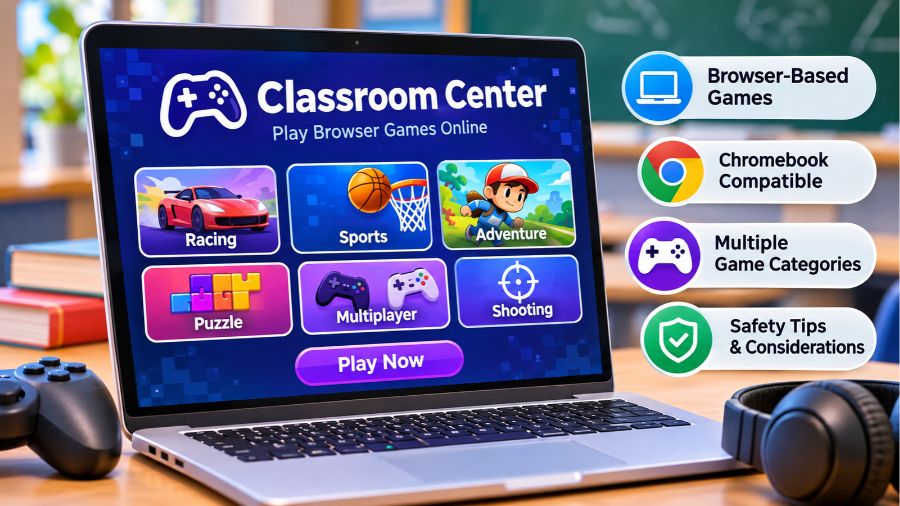
Classroom Center is a browser-based gaming platform that brings together free online games across different categories, including racing, sports, puzzles, adventure, and multiplayer entertainment. Popular among people searching for unblocked games and quick browser-based activities, the platform provides a way to explore different titles without necessarily installing separate gaming applications. Understanding its game collection, accessibility, device compatibility, limitations, and safety considerations can help students, casual players, and parents decide whether Classroom Center is an appropriate option for online entertainment.
What Is Classroom Center?
Classroom Center is a name used by online gaming websites that organize browser-playable games into accessible collections. One website operating under this name is classroom-center.github.io, which displays sections for trending games, recently listed titles, sports, racing, puzzles, adventure, and other gaming categories. Another website, classroom-center.com, also uses the Classroom Center name and presents a separate collection of online games. These websites should not automatically be treated as the same organization or service. Their shared naming reflects a similar focus on browser gaming rather than establishing common ownership, management, or infrastructure.
The central idea behind these platforms is straightforward: visitors can browse a collection of games, select a title, and attempt to play it through a web browser. This approach can make casual entertainment more convenient because users do not necessarily need to download a separate application for every game. However, individual game availability, technical requirements, and functionality depend on the website and the specific title being accessed.
How Does Classroom Center Work?
Classroom Center uses a website-based approach to organize and present games through individual game listings. Visitors generally begin at the homepage, explore available categories, and select a game they want to play. Depending on the title, the game may load directly within the browser or open through an embedded gaming interface. The experience therefore depends on the underlying game technology, browser compatibility, internet connection, and any restrictions imposed by the device or network.
Browser-Based Gaming Technology
Modern browser games commonly use technologies such as HTML5, JavaScript, and WebGL to deliver interactive experiences without requiring traditional desktop installations. These technologies support different gaming features, including animations, keyboard controls, sound effects, and three-dimensional graphics. However, the exact technology used by every Classroom Center listing has not been independently established, so it would be inaccurate to claim that all games use an identical technical framework. Users should also understand that browser-based games can still consume memory, processing power, and internet bandwidth.
Finding and Launching Games
The website’s category-based organization makes browsing easier than searching through unrelated gaming pages. Visitors can look for familiar titles, explore newly listed games, or select a particular genre based on their interests. Once a game is selected, its loading process depends on the game’s files and hosting arrangements. If a title does not open correctly, the problem may involve a temporary website issue, unavailable game content, browser settings, or network restrictions rather than the entire platform being inaccessible.
Main Game Categories Available on Classroom Center
The Classroom Center website at classroom-center.github.io displays several gaming categories that cover different interests and playing styles. Its homepage includes racing, sports, adventure, puzzle, multiplayer, shooting, casual, and clicker games. The actual selection can change as games are added, removed, or reorganized, making the live website a more reliable place to check current availability than an older list of titles.
Racing and Car Games
Racing games are an important part of the platform’s displayed collection. Titles such as Drift Hunters, Madalin Stunt Cars 2, Moto X3M, and Drift Boss represent different styles of driving entertainment. Some focus on controlling vehicles through challenging tracks, while others emphasize motorcycle stunts, drifting techniques, or obstacle-based challenges. These games can appeal to players who enjoy quick reactions, precision, and improving their performance through repeated attempts.
Sports Games
Sports games offer simplified digital versions of familiar athletic activities. The website lists titles such as Basketball Stars, Basketball Random, Football Legends, Basket Champs, and Doodle Baseball. These games generally focus on accessible controls and short gameplay sessions rather than reproducing every rule and detail of professional sports. They can provide casual entertainment for people interested in basketball, football, baseball, and other competitive activities.
Adventure and Platform Games
Adventure and platform games often combine movement, exploration, obstacles, and progression through different stages. Classroom Center lists titles including Subway Surfers, Temple Run 2, Vex 8, OvO, and Stickman Hook. These games appeal to players who enjoy timing challenges, jumping mechanics, obstacle avoidance, and progressively difficult levels. Some focus on endless running, while others provide structured stages that reward practice and coordination.
Puzzle and Brain Games
Puzzle games offer a different experience by emphasizing problem-solving rather than speed or competition. The platform displays games such as 2048, Block Blast, Suika Game, and Geometry Dash. Their gameplay varies considerably: some involve arranging numbers or shapes, while others require players to recognize patterns and react accurately to visual challenges. Puzzle-based entertainment can encourage logical thinking, although playing these games should not automatically be considered a substitute for structured educational activities.
Multiplayer and Shooting Games
Multiplayer games allow players to compete or interact with other participants through online gameplay. Classroom Center lists titles such as Shell Shockers, Among Us, 1v1.LOL, and Smash Karts. Shooting games and competitive arena experiences may involve aiming, movement, strategy, and coordination. Because multiplayer environments can involve interactions with unknown players, parents should consider the communication features, content, and age suitability of individual games before allowing children to participate.
Why Do Players Use Classroom Center?
The appeal of Classroom Center comes from its straightforward approach to online entertainment. Rather than requiring visitors to purchase or install multiple games, the website brings different titles together in one place. Its category-based layout can reduce the time needed to discover a suitable game, while the browser-based format offers flexibility for people using different types of computers. However, the actual experience depends on the quality of individual games, device performance, and website availability.
Convenient Access Without Separate Game Installations
One potential advantage of browser gaming is that users can try supported titles without downloading a dedicated desktop application. This can be useful on devices with limited storage or where installing additional software is inconvenient. Nevertheless, browser access does not mean that every game works instantly or without technical requirements. Some titles may need additional loading time, browser permissions, or compatible hardware.
Variety of Entertainment Options
The availability of multiple genres gives visitors opportunities to explore different gaming experiences from one homepage. Someone interested in racing can browse driving games, while another visitor might prefer puzzles, sports, or platform challenges. This variety makes the website relevant to different entertainment preferences, although the quality and availability of individual titles can vary.
Simple Navigation
A clearly organized gaming homepage makes it easier to discover content without navigating through complicated menus. Category labels and game thumbnails help visitors identify titles that match their interests. This type of interface can be particularly useful for casual players who want to find a game quickly rather than spend time learning a complicated gaming platform.
Does Classroom Center Work on Chromebooks?
Classroom Center may be accessible through a Chromebook’s web browser when the website and selected games are compatible with the device. Chromebooks support many modern web technologies, making them suitable for numerous browser-based games. However, performance depends on the Chromebook’s processor, available memory, graphics capabilities, browser version, and internet connection. Some games may work smoothly, while others may experience slow loading, control problems, or compatibility limitations. School-managed Chromebooks can also have administrator restrictions that prevent access to particular websites or gaming content.
Browser and Device Compatibility
A current version of Google Chrome generally provides a suitable starting point for testing browser-based games on a Chromebook. Other modern browsers may also work, depending on the game’s requirements. Users should keep their browsers updated and avoid installing unofficial extensions simply to make a particular game function. If a title fails to load, checking the browser’s compatibility and the website’s availability is more appropriate than assuming the Chromebook itself is defective.
Understanding School Network Restrictions
A website being described as an unblocked games platform does not guarantee access through every school network. Educational institutions often use content-filtering systems to manage internet access, protect students, and maintain appropriate learning environments. These systems may restrict gaming websites regardless of whether the games require downloads. Students should follow their institution’s technology policies instead of attempting to bypass network restrictions.
Is Classroom Center an Educational Platform?
Despite its name, Classroom Center should not be confused with a dedicated learning management system. The websites identified under this name primarily present online gaming collections rather than tools for managing lessons, assignments, grades, or student communication. This distinction is important because the word classroom can create an expectation that a website is officially connected to education. Its gaming content may provide recreational activities, but that does not establish formal educational accreditation, curriculum alignment, or approval by schools.
Classroom Center vs Google Classroom
Google Classroom is an educational service designed to help teachers organize assignments, distribute learning materials, communicate with students, and provide feedback. Classroom Center, in contrast, is associated with browser-based gaming and entertainment. Although their names sound similar, their intended purposes are different. Students looking for coursework, teacher instructions, assignment submissions, or classroom announcements should use the appropriate educational platform rather than a gaming website.
Is Classroom Center Safe to Use?
The safety of Classroom Center cannot be established simply from its name or the fact that games operate through a browser. A website’s security depends on factors such as its ownership, hosting practices, advertising arrangements, embedded content, privacy policies, and the external services it uses. No independent security audit or comprehensive verification of all listed games has been established here. Visitors should therefore avoid assuming that every game, advertisement, or external link is automatically safe. Parents and teachers should review the specific website and its content before recommending it to younger users.
Privacy and Personal Information
Users should be cautious when a gaming website requests information that is unnecessary for playing a game. Avoid entering passwords, personal addresses, phone numbers, financial details, or sensitive information into unfamiliar gaming pages. If a website requests account registration, review its privacy information and understand what data it collects before proceeding. Browser-based access alone does not guarantee that a service collects no personal information.
Advertising and External Links
Free online gaming websites may rely on advertising or external content to support their operations. Advertisements can sometimes lead visitors to unrelated websites, promotional offers, or unfamiliar downloads. Users should avoid clicking suspicious advertisements and should never install unexpected files simply because a game page recommends them. A reputable browser with appropriate security protections can help reduce certain risks, but it cannot eliminate every online threat.
Age Appropriateness and Parental Supervision
Not every game is suitable for every age group. Some titles may include competitive shooting, cartoon violence, online interactions, or themes that parents consider inappropriate for younger children. Reviewing individual game content and checking available age guidance can help families make better decisions. Parents should also consider screen-time limits and ensure that recreational gaming does not interfere with schoolwork, sleep, or other responsibilities.
Classroom Center Alternatives
Classroom Center is not the only website offering browser-based gaming collections. Several other platforms provide similar entertainment experiences, although their game libraries, website structures, ownership, and technical arrangements differ. Classroom 6x, ClassroomGame, and other unblocked gaming websites are examples of names that users may encounter when searching for online games. It is important to evaluate each platform independently rather than assuming that similarly named websites share the same developers or security standards.
Classroom 6x
Classroom 6x is another name associated with browser-based unblocked gaming collections. Websites using this name generally focus on providing access to different game genres through online interfaces. Visitors should check the specific domain they are accessing because similar names can be used by separate website operators. Game availability, privacy practices, and network compatibility should be assessed individually.
Other Browser Gaming Websites
Other online gaming collections may offer arcade, puzzle, racing, sports, and multiplayer experiences. Some specialize in particular genres, while others provide a broader catalog. Comparing their navigation, game selection, compatibility, advertising, and privacy information can help users identify a platform that meets their requirements. A larger game library does not necessarily mean better quality or stronger security.
Common Problems When Using Classroom Center
Although browser-based gaming can be convenient, visitors may occasionally encounter technical difficulties. A game might fail to load, display incorrectly, respond slowly, or stop working after a website update. These issues can originate from the game itself, browser compatibility, network connectivity, or external hosting services. Understanding the possible causes can help users distinguish between a temporary problem and a more persistent compatibility issue.
Games Not Loading
A game may fail to open because its hosting service is temporarily unavailable, its files have changed, or the website cannot establish the required connection. Checking the internet connection and refreshing the page can help identify temporary problems. If several games fail simultaneously, the issue may be related to the website or network rather than an individual title.
Slow Performance and Lag
Browser games can consume significant processing power and memory, particularly when they include complex animations or three-dimensional graphics. Running many browser tabs simultaneously can make performance worse, especially on devices with limited hardware resources. Closing unnecessary tabs and using a stable internet connection may improve the experience, although these steps cannot resolve every performance limitation.
Restricted Website Access
Some schools, workplaces, and managed networks restrict gaming websites through administrator-controlled filtering systems. Access can also vary according to network policies and device settings. Users should respect these restrictions and use personal devices and networks only where gaming is permitted.
The Future of Browser-Based Gaming
Browser-based gaming continues to benefit from improvements in web technologies, browser performance, and graphics capabilities. Modern web standards make it possible to create more interactive experiences without requiring users to install traditional desktop applications. Gaming websites can also organize increasingly varied collections of titles, making casual entertainment easier to discover. However, the future success of platforms such as Classroom Center will depend on factors beyond game quantity, including reliable hosting, transparent privacy practices, responsible advertising, content quality, and compatibility with modern devices. These developments offer opportunities for browser gaming, but they do not guarantee the long-term growth or reliability of any individual website.
Conclusion
Classroom Center represents the growing interest in accessible, browser-based gaming, bringing together different entertainment categories for casual players. Its game listings include racing, sports, adventure, puzzles, and multiplayer experiences, while its browser-focused approach can make selected titles convenient to access on compatible devices. However, similarly named websites should be distinguished, and claims about ownership, security, Chromebook compatibility, or school approval should not be accepted without verification. Ultimately, Classroom Center is best understood as an online gaming destination rather than an educational platform, and responsible use requires attention to privacy, age suitability, and school network policies.
Also read: Virtual Meeting Etiquette: 15 Essential Rules for Professional Online Calls
FAQs
1. What is Classroom Center?
Classroom Center is a name associated with online gaming websites that organize browser-playable titles across categories such as racing, sports, puzzles, adventure, and multiplayer entertainment.
2. Is Classroom Center free to use?
The identified websites display free-to-play game collections, although individual games, advertisements, external services, and website policies may have different conditions.
3. Can I play Classroom Center on a Chromebook?
Yes, compatible games may work through a Chromebook browser, but performance and accessibility depend on hardware, browser support, and network restrictions.
4. Is Classroom Center the same as Google Classroom?
No. Classroom Center is associated with online gaming, whereas Google Classroom provides educational tools for assignments, communication, learning materials, and classroom management.
5. Is Classroom Center safe for children?
Its safety has not been independently established. Parents should review individual games, advertisements, privacy practices, external links, and age suitability before allowing access.
6. Why is Classroom Center not working?
Possible reasons include internet connectivity problems, unavailable game files, browser compatibility issues, website downtime, or restrictions imposed by school and workplace networks.