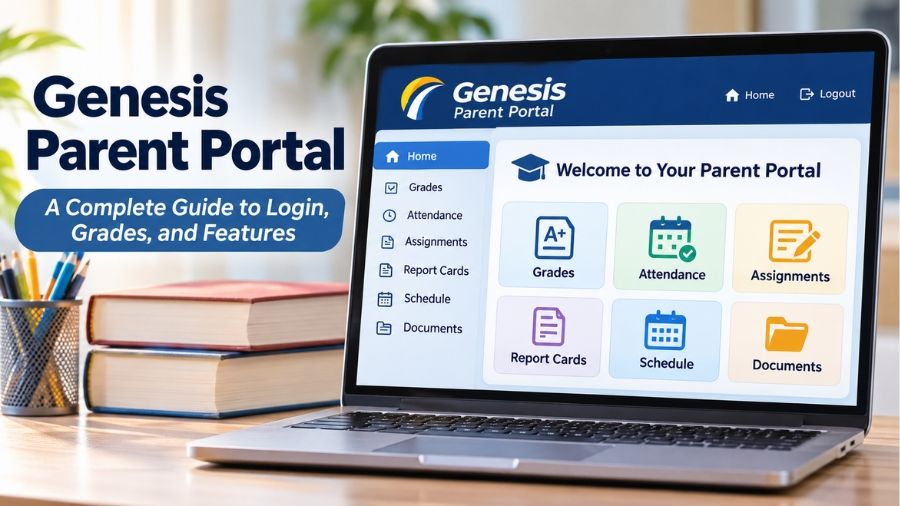
Genesis Parent Portal is an online student information system that helps parents and guardians monitor their children’s academic progress, attendance, grades, schedules, and school-related activities from one convenient platform. Developed as part of the Genesis Student Information System (SIS), the portal provides secure access to important educational records through a web browser. It is particularly popular among school districts in New Jersey, United States, where educational institutions use it to improve communication between families and schools. Whether parents want to check report cards, review homework assignments, update contact information, or monitor daily attendance, Genesis Parent Portal offers a centralized way to stay informed about their children’s education.
What Is Genesis Parent Portal?
Genesis Parent Portal is a web-based parent access platform included in the Genesis Student Information System, an educational software solution used by schools to manage student information and administrative activities. Its primary purpose is to give parents and guardians access to selected school records without requiring them to contact teachers or visit school offices for every update. Through an individual account, authorized users can view information such as academic grades, attendance records, report cards, class schedules, assignments, and other educational details. Genesis Educational Services provides the underlying software, while individual school districts configure the portal according to their requirements. This means the available information and features can differ between schools. The platform also supports communication between educational institutions and families by making important student information easier to access and review.
How Does Genesis Parent Portal Work?
Genesis Parent Portal works by connecting parents and guardians to student information maintained within their school district’s Genesis Student Information System. School administrators and authorized staff manage student records, academic information, attendance entries, and other educational data through the administrative system. Parents access the information through a separate login page using credentials provided or authorized by their school district. Once authenticated, users can navigate the available sections to review information about their children. The portal generally operates through a standard internet browser, allowing families to access their accounts from computers, laptops, tablets, and compatible smartphones. Its functionality depends on the district’s configuration, the student’s grade level, and the permissions assigned to each parent account. Consequently, two families using Genesis in different school districts may encounter slightly different dashboards and available services.
Key Features of Genesis Parent Portal
Genesis Parent Portal offers several features designed to make student information more accessible to families. Its capabilities extend beyond checking grades, allowing parents to review different aspects of their children’s educational experience through a centralized interface. Depending on the participating school district, the available modules may include academic records, attendance information, discipline records, documents, assessments, transportation details, and online forms. These features help parents maintain a clearer understanding of school activities while reducing the need for repeated administrative inquiries.
Student Grades and Academic Performance
The gradebook and grading sections are among the most useful features of Genesis Parent Portal because they allow parents to monitor academic performance throughout the school year. Depending on the school’s configuration, users may be able to review individual assignment scores, marking-period averages, examination results, and final grades. Some districts also provide teacher comments or additional information explaining student performance. This visibility helps parents identify subjects in which their children are performing well and areas where additional academic support may be useful. Instead of waiting until the end of a grading period, families can use available updates to maintain a better understanding of educational progress.
Attendance Records and Absence Tracking
Attendance monitoring is another important function of the Genesis system. Parents can review daily attendance records and, where enabled, individual class attendance information. The portal may display absences, lateness, and other attendance-related entries recorded by school staff. This information helps families identify attendance problems and contact the appropriate school office when an entry appears incorrect. Some school districts also provide attendance-related notifications or communication options. Regularly reviewing attendance information can help parents respond to unexpected absences and understand whether their children are meeting school attendance expectations.
Homework and Assignment Monitoring
The Gradebook section can provide information about classroom assignments, homework activities, and individual assessment results. Parents may be able to review assignment descriptions, due dates, grades, and teacher feedback, depending on the features enabled by their district. This information makes it easier to understand what students are expected to complete and whether assignments have been evaluated. Parents can use these records to discuss upcoming schoolwork with their children and identify areas where additional assistance may be needed. However, the portal should not automatically be treated as a complete replacement for classroom communication because teachers may use additional platforms or methods to distribute learning materials.
Report Cards and Academic History
Genesis Parent Portal can provide access to report cards and other academic records made available by the school. These documents help families understand performance across different subjects and grading periods. Some districts also enable access to previous academic information, standardized assessment results, or examination grades. Having these records available online can make it easier for parents to review educational progress and keep track of important school documents. The specific records displayed depend on the district’s settings and the student’s educational history.
Student Schedules and Transportation Information
The student summary section may include information about classroom schedules, homeroom assignments, teachers, and transportation arrangements. Some schools also make bus routes or other transportation details available through the portal. Parents can use this information to understand their children’s daily school routines and review relevant scheduling details. Certain scheduling features are specifically intended for upcoming school years, so the location of schedule information may change after a district completes its annual scheduling process. Not every district enables transportation and scheduling information for every student.
Online Forms and School Documents
Another useful capability is the ability to access school documents and complete selected forms electronically. Depending on the participating district, parents may receive permission forms, questionnaires, school letters, and other administrative documents through their accounts. Some forms support electronic signatures and online submission, helping reduce paperwork and unnecessary visits to school offices. Parents should review submission instructions carefully because certain finalized forms may require school staff assistance before information can be changed.
How to Log In to Genesis Parent Portal
Accessing Genesis Parent Portal requires the correct login address and account credentials associated with the student’s school district. Unlike services that provide one universal login page, Genesis parent access generally uses a district-specific website address. Parents should obtain the correct address from the official school website, enrollment information, or school administration. Once they have the correct portal address, they can enter their username and password to access the available student information. Some districts use a registered email address as the username, while others may provide a different login ID. After successfully signing in, parents can select their child’s profile and navigate the available sections. Families with multiple children in the same district may be able to access several student records through one parent account, depending on how the school has configured account permissions.
What to Do If You Forget Your Password
Parents who cannot remember their Genesis login password should first check whether their district’s portal provides a Forgot Password option. If available, the recovery process may require entering the email address associated with the school account. The system can then send password-reset instructions to the registered address. If the recovery option does not work, parents should contact their school’s main office or designated Genesis support representative. They may need to verify their identity before account credentials can be reset. Using an email address that is no longer accessible can also prevent successful password recovery.
How to Create a Genesis Parent Portal Account
Creating a Genesis Parent Portal account generally involves coordination with the school district rather than unrestricted public registration. During student enrollment or account setup, schools collect relevant parent and guardian information and establish access according to their administrative procedures. Parents may receive login credentials through a school-provided email or another approved communication method. In some districts, families must complete an account registration process before accessing the portal. Once an account is activated, users should sign in and review their contact information, including email addresses, telephone numbers, and emergency contacts. If a parent has more than one child attending schools within the same participating district, the school may link multiple student records to one account. Parents who cannot find an invitation or login information should contact the school instead of attempting to register through an unrelated website.
Benefits of Using Genesis Parent Portal
One of the main advantages of Genesis Parent Portal is that it brings different types of student information together in a centralized digital environment. Parents no longer need to depend entirely on printed report cards or occasional school meetings to understand their children’s academic progress. Access to grades, attendance records, assignments, and school documents can support more informed conversations between parents and students. The platform can also help schools reduce routine administrative work by allowing families to retrieve information and complete selected forms online. Another advantage is accessibility, since parents can generally use an internet-connected device rather than visiting a school computer. For teachers and administrators, the broader Genesis Student Information System provides tools for managing educational records and sharing selected information with authorized users. These benefits make the portal a practical communication resource for participating educational institutions.
Is Genesis Parent Portal Safe and Secure?
Student educational records contain personal information, so protecting access to these records is an important consideration. Genesis Parent Access is designed around authenticated accounts and configurable permissions that determine which information different users can view. Official Genesis documentation describes the parent module as a primarily read-only environment, although certain districts enable additional functions such as forms, contact management, and other account activities. Administrative settings also allow participating districts to manage account access and configure two-factor authentication where supported. Parents should protect their credentials, avoid sharing passwords, and sign out when using shared or public computers. They should also verify that they are visiting their school’s legitimate portal address before entering personal information. Although security controls can help protect student records, no online platform should be considered completely risk-free. School districts and families both have responsibilities when handling sensitive educational information.
Genesis Parent Portal vs. Student Portal
Although both services belong to the Genesis Student Information System, Parent Access and Student Access serve different audiences. The Parent Portal is intended for parents and guardians who need to monitor their children’s educational information and manage relevant school-related responsibilities. The Student Portal provides students with access to their own academic information through student-specific credentials and permissions. Both experiences may include information such as grades, schedules, assignments, and other academic details, but the available functions can differ according to the district’s configuration. Parents should use their designated parent accounts rather than attempting to access student accounts. This distinction helps schools manage permissions and provide information according to the needs of different users.
Common Genesis Parent Portal Problems and Solutions
Like other online educational platforms, Genesis Parent Portal users may occasionally experience login difficulties, missing information, or technical problems. Incorrect passwords, disabled accounts, outdated contact details, and temporary school system maintenance are possible reasons for access issues. Parents should first verify their login information and confirm that they are using the correct district-specific website. If an account remains inaccessible, contacting the school is generally the most appropriate next step because administrators can check account status and reset credentials when necessary. Missing grades or attendance entries may also reflect school reporting schedules rather than a technical error. Parents should contact the relevant teacher or administrative office when information appears incomplete or inaccurate. If the portal is temporarily unavailable, waiting and trying again later may help, particularly when the school district is performing system maintenance.
The Future of Digital Parent-School Communication
Digital student information systems are becoming an important part of modern school administration because they help educational institutions organize records and communicate with families. Genesis Parent Portal demonstrates how a centralized platform can make academic information more accessible while supporting administrative processes such as online forms, attendance monitoring, and document distribution. As schools continue to develop their digital services, features such as mobile-friendly interfaces, stronger account security, improved notifications, and more convenient communication tools remain relevant areas of development. However, technology cannot replace the importance of direct communication between teachers, students, and parents. The most effective approach combines reliable digital access with meaningful conversations about academic progress, classroom experiences, and student needs.
Conclusion
Genesis Parent Portal is a useful digital resource that helps parents and guardians stay informed about their children’s education through centralized access to academic records, attendance information, assignments, report cards, schedules, and school documents. As part of the Genesis Student Information System, it supports communication between families and participating school districts while helping make routine educational information easier to manage. Its available features, account registration procedures, and login arrangements depend on individual school configurations. Understanding how the portal works, how to access an account, and how to resolve common problems can help families use the platform more effectively. Ultimately, Genesis Parent Portal provides a practical way to strengthen parental involvement and maintain greater visibility into students’ educational experiences.
Also read: HEP2go: Complete Guide to Its Features, Benefits, Pricing, and Uses
FAQs
1. What is Genesis Parent Portal used for?
Genesis Parent Portal allows parents to access their children’s school information, including grades, attendance, assignments, schedules, report cards, and selected administrative documents.
2. Is Genesis Parent Portal free for parents?
Parents generally receive access through participating school districts without purchasing an individual subscription, although account availability depends on school arrangements.
3. Can I access Genesis Parent Portal on my phone?
Yes, parents can generally access the portal through a mobile web browser, although the interface and available features depend on district configuration.
4. How do I get my Genesis Parent Portal username and password?
Contact your child’s school for account credentials or registration instructions. Some districts send login information directly to registered parent email addresses.
5. Why is my Genesis Parent Portal account not working?
Common reasons include incorrect credentials, disabled accounts, incorrect portal addresses, or temporary maintenance. Contact your school’s Genesis administrator for assistance.
6. Can I check multiple children’s information through one account?
Yes, participating districts can link multiple student records to one parent account, allowing authorized guardians to access their children’s information together.