
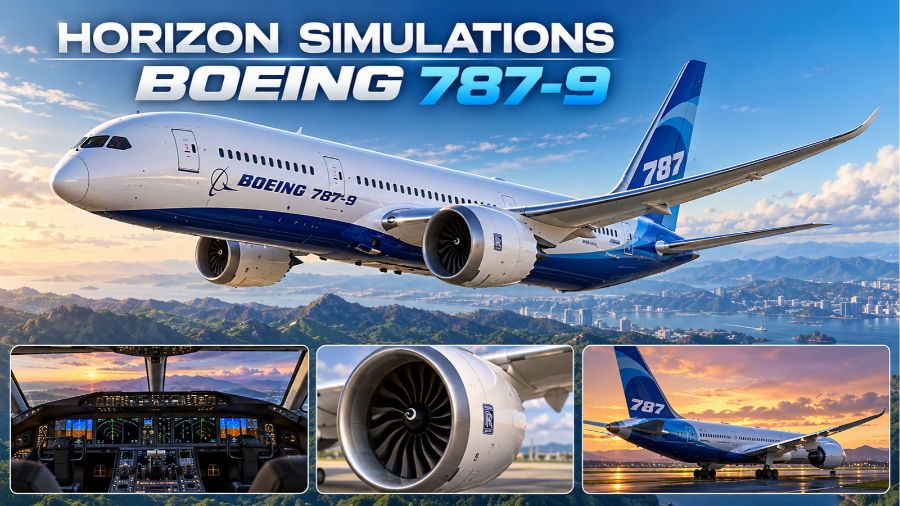
Horizon Simulations Boeing 787-9 has become a popular choice among flight simulation enthusiasts who want to experience the modern Dreamliner in Microsoft Flight Simulator. The aircraft add-on transforms the simulator’s default Boeing 787-10 into the smaller Boeing 787-9, offering an alternative for virtual pilots who enjoy long-haul operations, realistic airline liveries, detailed cockpit environments, and advanced flight simulation features. Developed by the Horizon Simulations team with community contributions, this project focuses on improving the overall flying experience through visual refinements, system modifications, and aircraft-specific adjustments. Its freeware availability has helped attract both beginners and experienced virtual airline pilots. However, understanding its requirements, compatibility, features, and limitations is important before installing it.
What Is Horizon Simulations Boeing 787-9?
Horizon Simulations Boeing 787-9 is a modification designed for Microsoft Flight Simulator that recreates the Boeing 787-9 Dreamliner using the underlying aircraft model from the default Boeing 787-10. Rather than building every component independently, the developers modify existing simulator assets and introduce improvements that make the aircraft feel more appropriate for the shorter 787-9 variant. These changes include exterior adjustments, flight characteristics, cockpit refinements, and additional functionality. The result is an alternative Dreamliner experience for players who want to operate a different member of Boeing’s 787 family. Although the add-on offers numerous enhancements, it remains dependent on the original aircraft content, so users should check the required simulator edition before installation.
Understanding the Boeing 787-9 Dreamliner
The real Boeing 787-9 is a wide-body, twin-engine commercial aircraft designed for efficient long-distance passenger travel. It belongs to Boeing’s Dreamliner family, which also includes the shorter 787-8 and the longer 787-10. The 787-9 combines a spacious cabin with a long operating range, making it suitable for international routes connecting major cities across continents. Its composite structure, aerodynamic design, advanced flight-deck technology, and efficient engines contribute to its reputation in modern aviation. Horizon Simulations aims to reproduce important aspects of this aircraft within the virtual environment. For aviation enthusiasts, the add-on provides an opportunity to explore long-haul operations, practise flight planning, and experience the procedures associated with flying a modern passenger jet.
Main Features and Improvements
One of the main attractions of Horizon Simulations Boeing 787-9 is its collection of improvements over the default aircraft experience. Depending on the installed version, users can benefit from updated aircraft configurations, refined cockpit elements, adjustments to flight behaviour, enhanced lighting, and detailed exterior presentation. The project also includes modifications intended to make the aircraft’s performance more appropriate for the 787-9. These enhancements can improve immersion during taxiing, takeoff, cruising, and landing. However, the precise features and behaviour depend on the installed release, simulator version, and configuration. Users should not assume that every system found in a professionally developed payware aircraft is included. The add-on is best understood as a community-developed enhancement project that continues to evolve through testing, updates, and developer feedback.
Cockpit Systems and Flight Deck Experience
The cockpit plays an important role in the appeal of any advanced airliner add-on. Horizon Simulations Boeing 787-9 builds on the original simulator aircraft while incorporating changes to selected displays, instruments, and systems. These refinements help create a more engaging environment for pilots who enjoy managing navigation, aircraft performance, and flight procedures. The 787 family’s modern flight deck includes multifunction displays, flight management functions, autopilot controls, and communication systems that support complex operations. Some Horizon Simulations releases also incorporate additional functionality associated with electronic communications, including CPDLC integration. Nevertheless, system depth can vary, and certain controls may behave differently depending on the simulator version. Beginners can start with basic autopilot and navigation operations before progressing toward more advanced procedures and realistic airline-style flights.
Flight Performance and Handling
Aircraft handling is another important consideration when evaluating Horizon Simulations Boeing 787-9. The developers have worked on flight-model adjustments intended to better represent the smaller Dreamliner, including changes related to drag, lift, fuel consumption, flap behaviour, and engine performance. These elements influence how the aircraft accelerates, climbs, cruises, descends, and responds during landing. Correct loading, centre-of-gravity settings, and stabiliser trim remain important for safe and predictable simulator operations. Pilots should also follow suitable approach speeds and avoid excessive control inputs during takeoff. Although these modifications aim to improve realism, the add-on should not be treated as an exact substitute for the certified aircraft’s operational data. Performance can vary with simulator updates, weather settings, payload, and the installed aircraft configuration.
Engine Options and Aircraft Details
The Boeing 787 family operates with two principal engine families: the Rolls-Royce Trent 1000 and the General Electric GEnx. Horizon Simulations has incorporated engine-related options and refinements into its aircraft project, helping virtual pilots explore different configurations. Engine selection can influence the presentation of instruments, sounds, and certain aircraft details, depending on the release. These differences add variety for enthusiasts who enjoy reproducing airline operations and learning about the technical distinctions between aircraft variants. Exterior details, lighting, animations, wing flex, and landing-gear presentation also contribute to the overall experience. While such features can make a simulator aircraft feel more convincing, their availability and accuracy should be assessed against the current version rather than assumed from older reviews or screenshots.
Liveries and Visual Customization
Liveries allow players to customise the aircraft’s appearance and recreate the fleets of real-world airlines. Horizon Simulations Boeing 787-9 has benefited from community-created paint schemes and aircraft-specific visual packages, giving users opportunities to personalise their virtual flights. A livery may represent a familiar international airline, a special promotional design, or a fictional operator created by the community. These options are particularly attractive to virtual airline members who follow realistic routes and fleet assignments. Before installing a paint scheme, users should confirm that it supports the correct aircraft variant and current add-on version. An incompatible livery can produce missing textures, incorrect markings, or visual problems. Keeping the aircraft and liveries organised also makes it easier to troubleshoot issues after simulator updates.
Compatibility With Microsoft Flight Simulator 2020 and 2024
Compatibility is one of the most important details to understand before installing Horizon Simulations Boeing 787-9. The add-on was originally built around the Boeing 787-10 available in the Premium Deluxe content of Microsoft Flight Simulator 2020. A later update introduced support for Microsoft Flight Simulator 2024, but that compatibility relies on the required 2020 aircraft content rather than simply using the separate native 2024 aircraft. Users running the add-on in MSFS 2024 may therefore need to enable the MSFS 2020 Boeing 787-10 through their simulator library. Missing dependencies or conflicting aircraft versions can lead to incorrect textures, cockpit problems, or other unexpected behaviour. Because compatibility requirements can change, checking the current installation notes is advisable before making changes to the simulator library.
How to Install Horizon Simulations Boeing 787-9
Installing the aircraft generally involves obtaining the package through a supported distribution channel, such as Orbx Central or the Headwind Simulations installer, and following the instructions provided for the selected simulator. Before beginning, confirm that the required Boeing 787-10 content is available and installed. Users should close the simulator if instructed, install the appropriate package, and allow the installer to place the aircraft files in the correct location. For MSFS 2024, check that the required 2020 aircraft content is enabled. If an older installation produces problems, a clean uninstall and reinstall may help resolve conflicting files. After installation, launch the simulator, select the Horizon Simulations Boeing 787-9, inspect the aircraft configuration, and conduct a short test flight before attempting a lengthy international journey.
Benefits for Beginners and Experienced Pilots
Horizon Simulations Boeing 787-9 can appeal to different types of flight simulation users. Beginners may appreciate the opportunity to learn basic airliner operations, explore cockpit instruments, practise navigation, and understand the stages of a long-haul flight. More experienced users may enjoy configuring realistic routes, working with flight planning tools, managing aircraft performance, and reproducing airline procedures. Virtual airline communities can also benefit from the additional aircraft variant when building realistic fleets and schedules. However, new pilots should recognise that the Dreamliner has a learning curve, particularly when dealing with flight management systems, autopilot modes, descent planning, and approach preparation. Starting with short, uncomplicated routes and gradually introducing more complex procedures can make the learning process more rewarding.
Limitations and Troubleshooting Tips
Despite its strengths, Horizon Simulations Boeing 787-9 has limitations that users should consider. Because it builds on an existing simulator aircraft, it does not necessarily provide the same independence, modelling depth, or complete system coverage as a fully custom-developed airliner. Some features may remain incomplete, while simulator updates can introduce compatibility problems or unexpected behaviour. Common troubleshooting steps include checking the required aircraft content, updating the add-on, verifying livery compatibility, and reinstalling the package when recommended. Users should also confirm that their simulator recognises the correct aircraft version. If the aircraft displays missing textures or cockpit elements, checking for conflicting aircraft packages is sensible. Reviewing recent community feedback can help identify known problems, but unofficial fixes should be used carefully to avoid damaging an otherwise functional installation.
Future Development and Community Support
Horizon Simulations has continued to share development progress on its broader Boeing 787 project, including plans for a more substantial Version 2 update. Development previews have highlighted ambitions for improved exterior models, additional aircraft variants, expanded cockpit functionality, and other refinements intended to enhance realism. Such plans demonstrate the project’s ongoing development, but previewed features should not automatically be treated as available in the current public release. The most reliable way to understand the latest capabilities is to check the version information supplied with the installed package. Community discussions can also provide useful advice about installation, flight behaviour, and configuration. As with any evolving freeware project, development timelines and feature availability can change, so users should distinguish confirmed releases from anticipated improvements.
Also read: What Is 8.0.9
Conclusion
Horizon Simulations Boeing 787-9 offers Microsoft Flight Simulator enthusiasts an appealing way to experience a modified version of Boeing’s long-range Dreamliner. Its visual improvements, aircraft-specific adjustments, engine options, community liveries, and additional cockpit functionality make it an interesting choice for virtual pilots who enjoy international airline operations. Its freeware distribution is another advantage, although the required Boeing 787-10 content and simulator compatibility must be considered before installation. The add-on also has limitations because it builds on an existing aircraft model and continues to evolve through updates. Overall, Horizon Simulations Boeing 787-9 is worth considering for users who want a more varied Dreamliner experience, provided they verify the current version, follow the installation instructions, and understand the distinction between a community modification and a fully independent aircraft simulation.